Reporting · Rootcraft, included for every agency
Monthly client reports, ready for your yes.
Every client’s report drafted each month from their own accounts, in your agency’s brand, with a summary your team can trust, written in your agency’s voice from your Reporting playbook. Nothing reaches a client until a person approves it.
What Reporting does
Drafted every month
For every client, on the day you choose (the 2nd by default), from their own connected accounts. Every number comes straight from the source.
At a glance
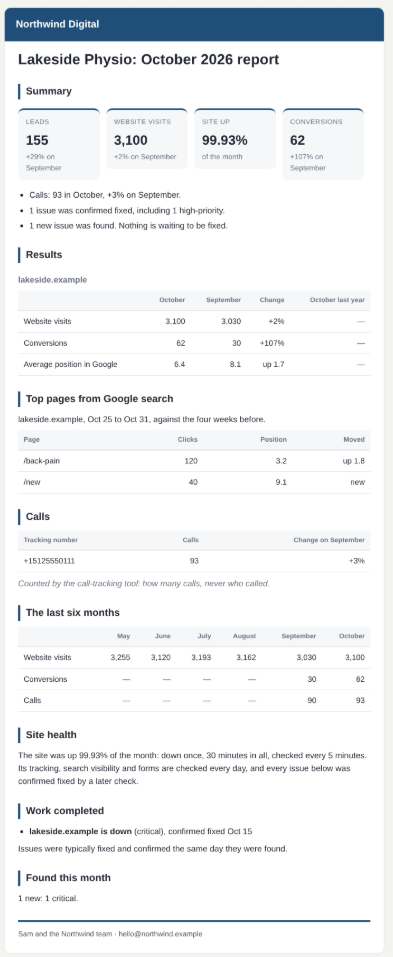
Leads (calls plus conversions) against last month, and how much of the month the site was up.
Results per site
Visits, conversions, revenue, clicks and appearances in Google search, and average position, each against last month and the same month last year. Plus the top pages from Google search and how each one moved.
Google Ads and calls
Ads spend, clicks, conversions, cost per conversion and conversion value, per account and per location. Calls per tracking number: answered, missed and first-time callers.
Six months side by side
Visits, search clicks, conversions, calls and ad spend for the last six months, so the trend is obvious.
The work, in plain sight
Site health, the work confirmed fixed, what was found this month and anything still open that matters, plus a “Next month” section for your plan.
A summary you can trust
Optionally written by the AI assistant in your agency’s own voice, and only kept if every number in it comes from the report.
In your agency’s brand
Your name, logo, colour and sign-off on every emailed and shared report. The client sees your agency, never Rootcraft.
Your say-so
Someone reads the draft, adds a note, or (with Reeva) asks her to change it: take out a section, change the wording, add a paragraph. Their edits are kept even if the report is redrafted. Then they approve sending it in Slack. If it changes after that, approval is asked for again.
Sent from your mailbox
Emailed from your agency’s own mailbox, to the recipients and CC you choose, with replies going where you choose. Or share a private link the client can open without an account, which expires and can be turned off at any time. Every report prints cleanly as a PDF.
The value report
Monthly, for the agency owner: what was found and confirmed fixed, by severity and by client, highlights, the checks run and the hours of work they stood in for, results against the targets you agreed, and how the team used Reeva.
How often it runs
Drafted every month on the day you choose, the 2nd by default.
What your team hears in Slack
Rootcraft brings each draft to the person who approves it. With Reeva, anyone can ask her to change it, or ask “How did Acme do last month?”
The monthly report, start to finish.
- 01
The numbers are pulled
Every client’s figures come straight from GA4, Search Console, Google Ads, your call tracking and your other connected tools.
- 02
A draft is written
Each client gets a report draft in your agency’s brand, with a summary of what changed and why.
- 03
Your team reviews it
The account lead adds a note, or with Reeva asks her to change a section or the wording, and adds the context only they know.
- 04
Approved and sent
Nothing goes out until they say yes in Slack. It’s emailed from your own mailbox, with a private link the client can open.
- 05
The value report
The owner sees what the platform did that month: issues found and confirmed fixed, and the hours of work the checks stood in for.
The report, ready for a yes.
When a client’s report is ready, Rootcraft sends it to the person who approves it. They can read the full draft first, change who it goes to, or reject it. Nothing is sent until they decide.